Have a backlink with me...leave your comments if you're interested

Sunday, May 1, 2011

D BETTER WORLD SPECIFICATIONs

Where the mind is without fear and the head is held high

Where knowledge is free;

Where the world has not been broken up into fragments by narrow domestic walls;

Where words comes out from depth of truth;

Where tireless striving stretches its arms towards perfection;

Where the clear stream of reason has not lost its way into the dreary desert sand of dead habit…


Waiting for those days when these lines will get true on D every single square feet of this earth :)


p.S. :- The above lines are a part of "GITANJALI" Creation of D Royal Bengal Genius Mr. Rabindranath Tagore...

What to DO now ... ( think in a future prospect)

...D biggest question of everyone life...asked by D Inner soul to you whenever you are just In D verge of reaching to a great peace of mind . And if you don't have a satisfactory answer for yourself Den forgets d GREAT PEACE of mind because you can confuse anybody in this world except yourself.


D science is discovering in every second of life a new meaning to explore D world. Why can't it generate or create something which can answer this question and give us D peace we want in our life. Take an example of me. D biggest peace I have only when I was a Kid with no school .After that since Den I m just taking parts In D race till now. When I was in school I was taking part in d RACE Of achieving 1st rank in my class, to get ahead in d herd always. After school I was pushed back Into D race to conquer 1 seat for myself In some Institutions ,D Institutions from which after you get passed out ,you will feel proud ( as I do certainly) . And if you look back in your past you will say thanks to them who pushed you to race, to conquer (and so I DO). However my mind really never ever wanted to gain book knowledge. It was always looking for pragmatic way of teaching which I get little bit amid my undergraduate study.

However thanks to My BACK-Pusher, I am now doing job with a MNC which is only behaving MNC type by its name. I am neither fed up of this job nor of my working environment’s thing d COMPANY policy. It Is making my mind ( and thus pushing me In another race, thanks for that) to leave D job because I think ( oh great I think also )..There will be no use of my talent in this job.

So here I am back again in another race. Either to Change my job or to get In Higher studies (just wish me luck)

P.s. -: D author is a NITIAN :)

Friday, November 27, 2009

Break password within astrisk


1. Click Start
2. go to RUN type "CMD" and press enter
3. then enter net user command
4. you can see the whole user accounts running on your machine.
5.Then see d user account which u want to change d password

then enter this command
net user {user account name } * ------ put the user account name which u want to change the password in between d braces and after dat asterisk mark. d asterisk is important
6. you will see this line coming out
Type a password for the user :

7. well u cant see what u r typing so beware after hitting enter you will ask again to retype after that you password get changed successfully.

IF you like this post please comment

Thursday, November 26, 2009

TWO Gtalk Account on One single computer !!!!!!


Guys Gtalk application provided by GOOGLE.com is a nice instant messenger to get connected with lots of friend of yours. It shows you easily a quick overview of your inbox content whenever you do a login which in my case helps me a lot. Most of the persons are coming to this application every day and becoming a part of GTALK WORLD... well however sometimes it happen that you just have two gmail accounts and you want to login in gtalk with both google accounts but you cant do it simultaneously because GTALK provide only one login at a time. Well i have a simple trick for you after that you can play with your gtalk with your TWO SEPARATE totally different GTALK or GOOGLE or GMAIL accounts.

Okie.. where ever is your gtalk shortcut in your computer is...either in startup or in desktop or in quicklaunch...

1st. Right click on it...and go to its properties { it will open a new window saying "Google Talk properties"}

2nd. Then see the target field you can see something like this ".....{"C:\Program Files\Google\Google Talk\googletalk.exe" /startmenu} "...

3rd and important step... Okie remove the "startmenu" and write "nomutex" ......... it will become like this ".....{ "C:\Program Files\Google\Google Talk\googletalk.exe" /nomutex}"....

4th and final step.....now CLICK on OK ...and CLICK on that shortcut as many time as many GTALKS you need......
Add Image


well ..i hope you are going to like this post if you do please review..

Wednesday, September 30, 2009

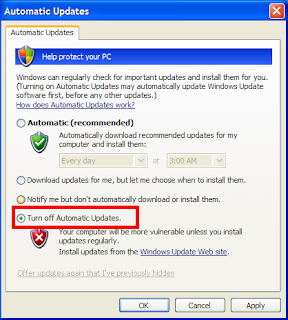
How to turn on Automatic updates in your personal computer


Due to some malfunctioning in your windows XP operating system sometimes it happens that your automatic updates can't get turn on.
It may happen due to some viruses, Trojan, or other things,however if you want to turn on the AUTOMATIC UPDATES just follow this simple steps.

Try registering the following:

Click Start, select Run and type:

regsvr32 wuapi.dll

regsvr32 wuaueng.dll

regsvr32 atl.dll

regsvr32 wucltui.dll

regsvr32 wups.dl
l


Press enter after each one and wait for the success message

After registering these dll files by RUN mode,your automatic updates will be start working instantaneously.
After that Enjoy your genuine Microsoft automatic updates which help to protect your personal computer from suspicious activities.

Tuesday, September 29, 2009

how to install window media player 11 -wmp11 bypassing wga check....window geunine advantage check


Windows Media Player 11, a media player by Microsoft systems is easily available for free download at Microsoft website officially, nevertheless, If you are having trouble installing Microsoft Windows Media Player 11 because of Windows Genuine Advantage-WGA check failure a genuine Microsoft operating system copy check tool; here is an simple trick to bypass the WGA installation and check without using any illegal crack.


Windows Media Player 11 installation bypassing WGA install and check:

1.Download Windows Media Player 11 installer from official website here.

FOR DOWNLOAD WINDOW MEDIA PLAYER 11 CLICK HERE

2.Download and install Winrar( it is easily available).

3.Right-click the downloaded file wmp11-windowsxp-x86-enu.exe and choose Extract to wmp11-windowsxp-x86-enu.exe/ from Winrar/Winzip shell context-menu as shown below.


4.Now, launch wmfdist11.exe and install the media player runtimes.


5. Restart your system.

6.Now launch the WMP11 setup wizard by executing - wmp11.exe and complete the setup process.


7. Now enjoy your favorite music on your perfect genuine player.

Saturday, August 22, 2009

Download gAlwaysIdle.exe to make your GTALK Status Always Idle


GTALK is a chatting application of GOOGLE which is very popular due to its simplicity and too much features. It is one of the best and lean instant messengers. Its use has considerably increased with its integration with ORKUT, a social networking site which is nowadays very much famous in all groups of different ages and also a web 18 genius award winner. Yes, its true that you cant play tic-tac-toe or make a buzz or send sounding emoticons or check weathers, however somewhere these not-added features in GTALK makes it too much popular. You can find your GTALK application in your GMAIL too. However, back when GMAIL Chat hadn’t introduced the Invisible mode, there was no way you could remain invisible from your GTALK friends when logged in. However, there is a program called gAlwaysIdle then, and when I am in a mood of “do not disturb me I am quite busy right now”; I just use it to change my status to ‘Idle’ on Google Talk (the yellow icon).

If you are an active user of both Google Talk and GMAIL chat simultaneously then I think you know that Invisible mode doesn’t work when you’re using both. That’s when gAlwaysIdle could home handy. gAlwaysIdle was build by a former Microsoft developer. It enables you to set the status of GTALK client with an extra option of being Idle permanently without actual leaving your computer, preventing unexpected disturbs (people normally didn’t buzz you while you’re not in front of computer). It supports XP SP2 and vista, grab it here and use it.


DOWNLOAD gAlwaysIdle.exe in the fastest way and free

Saturday, August 15, 2009

Video Lan Client Media Player----VLC Media Player 1.0.1


Are you getting tired of different types of specially built media players for special type of media files? Are you want to play any type of your favorite media file with a single click without getting your hand busy in search of some codec file needed for it while u try to play it in window media player? Are you wanted to play your movie file without taking care of its file extension? If you want to play your favorite media files video files in a single click and without downloading every time a special codec for files just download the Video Lan Client Media Player (VLC media player). Don’t get afraid by its tedious name. Its name might be look too much strange to you while operating on VLC media player is too easy. Just give it a shot man.


VLC Media Player is one of the most popular applications now a day for the most of computer users of modern world that have been recently updated to the 1.0 version, and now a new flavor has been released to users. VLC Media Player 1.0.1 comes with a series of improvements and bug fixes, including translation updates, fix for Qt and MacOS interface or codec updates for Mac OS and Windows. It is a open source software so you can easily download its code and modify it.

VLC Media Player comes as a highly portable multimedia player that also works as a multimedia framework that can play back almost all the audio and video formats available today, including MPEG-2, MPEG-4, H.264, DivX, MPEG-1, mp3, ogg, aac, and more. In addition, the player can also read DVDs, Audio CDs, VCDs and a series of streaming protocols.

The change log of VLC Media Player 1.0.1 shows, besides the already mentioned features, flv and mpeg2 seeking, along with wmv, wav, rtsp and ssa support, a fix of an integer underflow in Real pseudo-RTSP module, as well as port of the ZVBI module to Windows for full teletext support.

Improvements added to the existing features of VLC media player is Live recording, Instant pausing and Frame-by-Frame support, Zipped file playback, Customizable toolbars, AirTunes streaming, MTP devices on linux, Video scaling in full screen, RTSP Trick play support, or the fact that it can be used as server to stream on IPv4 or IPv6 via high-bandwidth networks.


Here are some key features of "VLC Media Player":

· Free, Open Source and cross-platform media player.
· Independant of systems codecs to support most video types.
· Can also be used as a streaming server, with extended features (video on demand, on the fly transcoding, ...).
· Live recording.
· Instant pausing and Frame-by-Frame support.
· Finer speed controls.
· New HD codecs (AES3, Dolby Digital Plus, TrueHD, Blu-Ray Linear PCM, Real Video 3.0 and 4.0, ...).
· New formats (Raw Dirac, M2TS, ...) and major improvements in many formats...
· New Dirac encoder and MP3 fixed-point encoder.
· Video scaling in fullscreen.
· RTSP Trickplay support.
· Zipped file playback.
· Customizable toolbars.
· Easier encoding GUI in Qt interface.
· Better integration in Gtk environments.
· MTP devices on linux.
· AirTunes streaming.
· New skin for the skins2 interface.


While window media player 11 setup comes with a size of 21 mb while VLC media player 1.0.1 for windows comes in a size of 19 mb. So you should try it. Here are the links for downloading VLC media player for various operation systems.


Download VLC Media Player 1.0.1 for Mac OS X


Download VLC Media Player 1.0.1 for Windows

VLC-Media-Player.shtml">Download Portable VLC Media Player 1.0.0 for Windows

Download VLC Media Player 1.0.1 for Linux

Tuesday, August 11, 2009

Internet Download Manager- the fastest download manager


Are you getting bored with the slow speed of downloading in your internet connection? Are you too much eager for seeing things what you are downloading from the internet as soon as possible? Are you getting tired of use of old download accelerators like DAP and others?


If your answer is “YES” for above questions then there is something new for you here. Here is the new download accelerator in this cutting edge of technology “Internet Download Manager”(IDM).
A really good, fast, easily usable, can be integrated with most of browsers and a lifeline for slow internet connection users. You can schedule, resume and accelerate downloads by up to 5 times with this accelerator. You can say this really true masterpiece. It comes with a 30day trial package and after 30 day you can’t live without it.

Here are some key features of Internet Download managers

v All popular browsers and applications are supported and can be integrated into any 3rd party Internet applications.

v Download with one click-click on a download link in a browser, IDM will take over the download and accelerate it. It supports HTTP, FTP and HTTPS protocols.

v Download Speed- IDM can accelerate downloads by up to 5 times due to its intelligent dynamic file segmentation technology.

v Resume able Downloads-IDM will resume unfinished download from the place where they left off.

v Simple installation -Quick and easy installation program will make necessary settings for you, and check your connection at the end to ensure trouble free installation of IDM.

v Automatic Antivirus lookup-It makes your downloads free from viruses and Trojans, the most annoying thing on internet.

v Advanced Browser Integration-This feature can be used to catch any download from any application, when enabled I don’t think any of download managers have this feature.

v Built-in Scheduler- IDM can connect to the Internet at a set time, download the files you want, disconnect, or shut down your computer when it's done so that you can rely totally on your computer and take a good NAP.

v Proxy servers-works with Microsoft ISA, and FTP proxy servers.

v Authentication protocols-Basic, Negotiate, NTLM, and Kerberos. Thus IDM can access many Internet and proxy servers using login name and password.

v Download all feature-IDM can add all downloads linked to the current page.

v Customizable Interface-Choose the order, buttons and columns appear on the main IDM window.

v Download Categories-IDM downloads are organized automatically using defined download categories.

v Quick Update Feature-Quick update may check for new versions of IDM and update IDM once per week.

v Download limits-Progressive downloading with quotas feature. The feature is useful for connections that use some kind of fair access policy (or FAP) like Direcway, Direct PC, Hughes, etc.

v Drag and Drop-Simply drag and drop links to IDM, and drag and drop complete files out of Internet Download Manager.

v Multilingual- use it in Arabic, Bosnian, Bulgarian, Chinese, Croatian, Czech, Danish, Dutch, French, German, Hungarian, Italian, Japanese, Lithuanian, Macedonian, Polish, Portuguese, Romanian, Russian, Slovenian, Spanish, Thai languages.


You can download your own Latest IDM copy by dowloading on the following link

DOWNLOAD IDM 5.17

Sunday, August 9, 2009

Decoding Error Messages - Web


As you surf the Net, you will undoubtedly find that at times you can't access certain websites. Why, you make wonder? Error messages attempt to explain the reason for that and other problems. Unfortunately, these cryptic messages baffle most people. We've deciphered the most common ones:


400 - Bad Request


Problem: There's something wrong with the address you entered. You may not be authorized to access the web page, or maybe it no longer exists.

Solution: Check the address carefully, especially if the address is long. Make sure that the slashes are correct (they should be forward slashes) and that all the names are properly spelled. Web addresses are case sensitive, so check that the names are capitalized in your entry as they are in the original reference to the website.


401 - Unauthorized


Problem: You can't access a website because you're not on the guest list, your password is invalid or you have entered your password incorrectly.

Solution: If you think you have authorization, try typing your password again. Remember that passwords are case sensitive.


403 - Forbidden


Problem: Essentially the same as a 401.

Solution: Try entering your password again or move on to another site.


404 - Not Found


Problem: Either the web page no longer exists on the server or it is nowhere to be found.

Solution: Check the address carefully and try entering it again. You might also see if the site has a search engine. If so, use it to hunt for the document. (It's not uncommon for pages to change their addresses when a website is redesigned.) To get to the home page of the site, delete everything after the domain name and hit the Enter or Return key. For example, if the address is:

http://careurcomp.blogspot.com/2009/08/decoding-error-messages-web.html

Remove English/HTML/ email.htm.


503 - Service unavailable


Problem: Your Internet service provider (ISP) or your Internet connection may be down.

Solution: Take a stretch, wait a few minutes and try again. If you still have no luck, phone your ISP or system administrator.